MSA에서 동시에 여러 API 호출로 응답 시간 줄이기
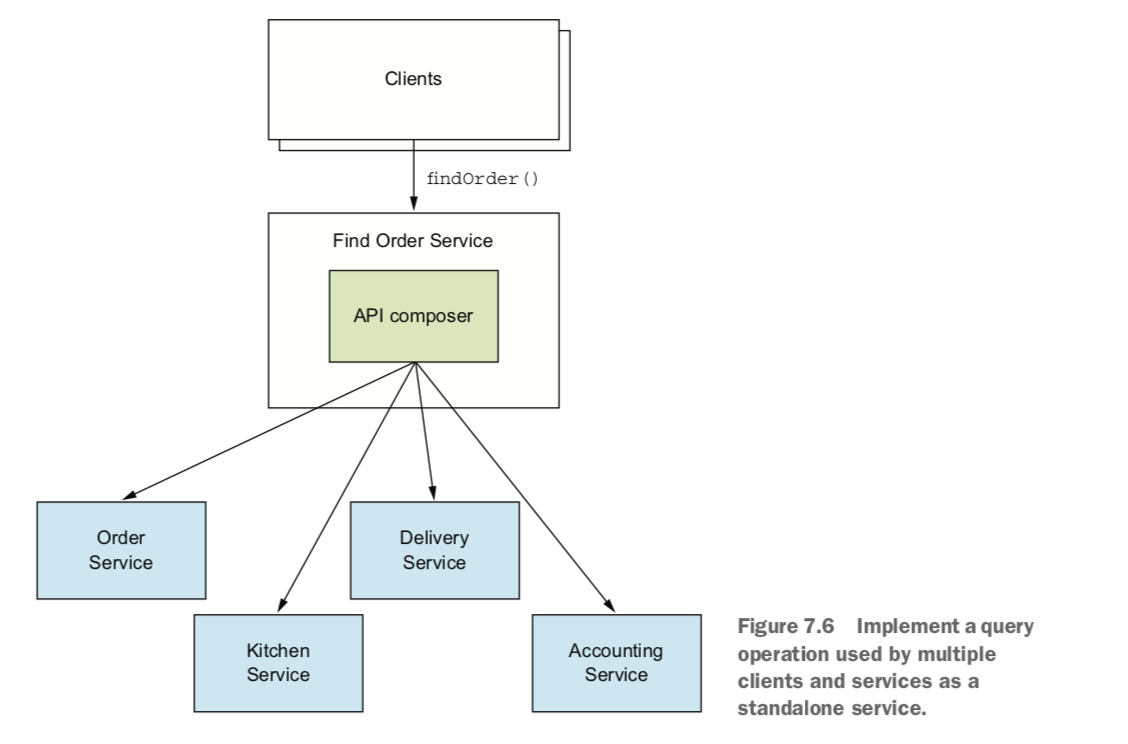
쇼핑몰의 주문 상세 화면은 일반적으로 주문 내역과 배송 정보, 결제 정보 등을 보여준다. 이럴 때 하나의 데이터베이스를 사용하는 모놀리틱 아키텍처Monolithic Architecture에서는 여러 테이블을 조인하면 되지만 다수의 서로 다른 데이터베이스를 사용하는 마이크로서비스 아키텍처Microservice Architecture에서는 여러 마이크로서비스의 데이터베이스에 정보가 들어 있기 때문에 데이터베이스의 물리적 조인이 어렵다. 따라서 마이크로서비스 아키텍처에서 주문 상세 화면은 여러 API를 호출하여 화면을 구성하기 마련이다.
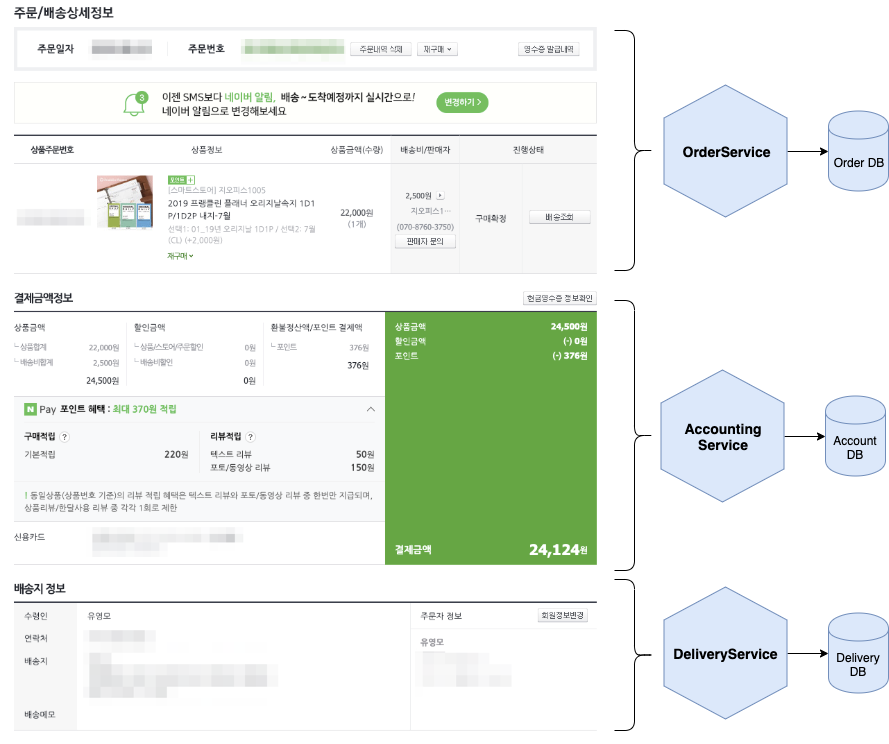
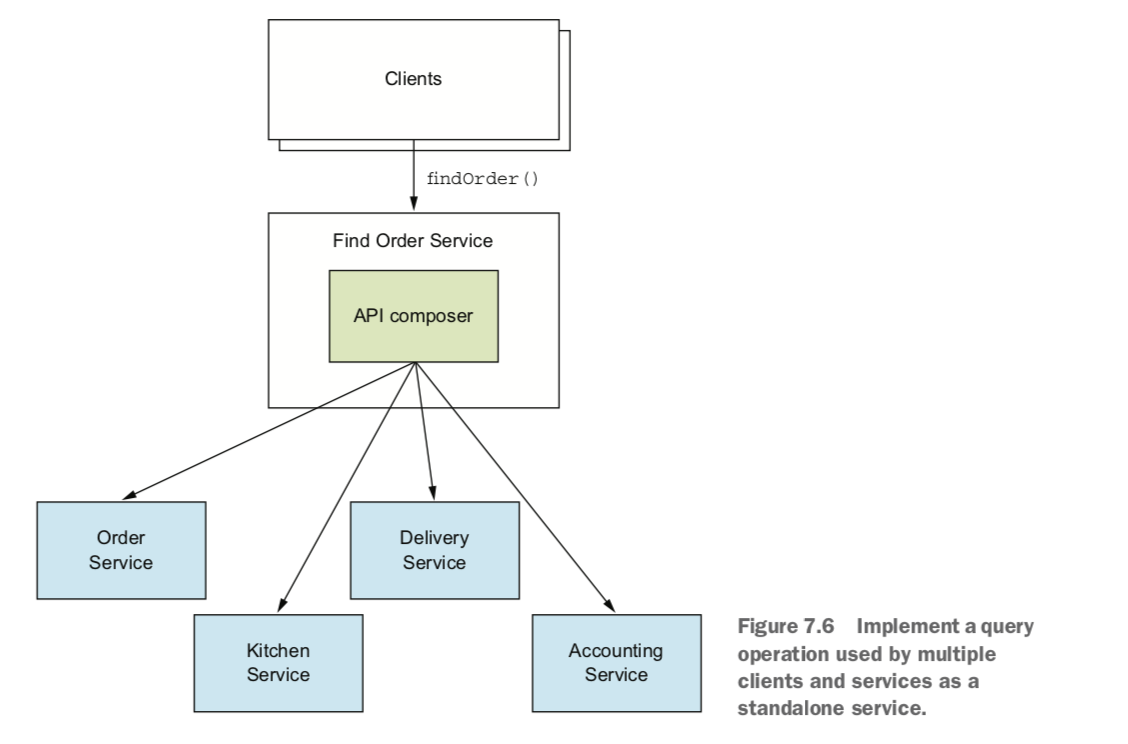
주문 상세 화면을 구성하는 조립된 데이터의 덩어리(이하 주문 상세 조립물)가 여러 클라이언트에서 필요할 경우 하나의 API로 제공할 수 있다. 크리스 리처드슨Chris Richardson은 이것을 API Composition이라고 부른다.
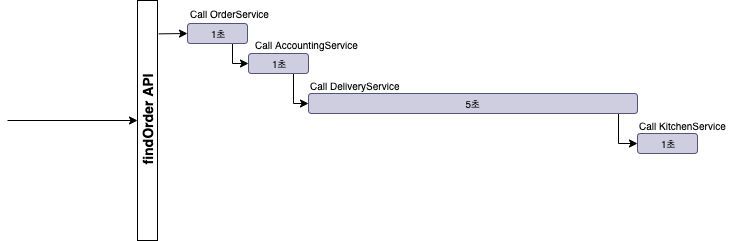
위의 FindOrderService에서 주문 상세 조립물을 만들기 위해 API를 순차적으로 호출한다면 API가 많으면 많을수록 응답 시간이 길어질 것이다. 예를 들어 OrderService, KitchenService, AccountingService는 각 1초가 걸렸지만 DeliveryService에서 5초가 걸렸다면 결과적으로 응답 시간은 8초가 걸린다.
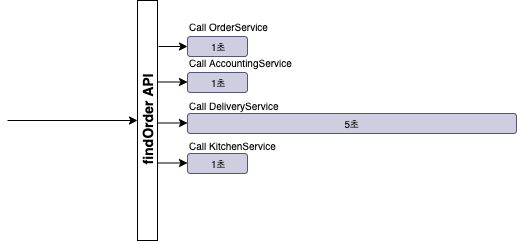
반면 동시에 API를 호출하여 데이터를 조립한다면 상대적으로 응답 시간을 줄일 수 있다.
Java에서는 아래와 같은 기술을 채용하여 동시성을 구현할 수 있다.
- Java 8 - CompletableFuture
- Project Reactor - Monos
- RxJava - Observables
이 글은 CompletableFuture에 대해 알아보고 여러 API를 동시에 호출하여 결과를 조립하는 방법을 소개한다.
Java 5 동시성Concurrency API
Java에서는 동시성을 Thread로 구현한다. Java 5에 도입된 Concurrency API(java.util.concurrent 패키지)를 사용하여 여러 Thread에 API 호출하는 작업을 할당하여 동시에 실행하는 것을 아래와 같이 구현할 수 있다.
// API 호출 작업
Callable<OrderInformation> task1 = () -> {
  OrderInformation orderInformation =
      restTemplate.getForObject(String.format("http://localhost:8081/orders/%s", orderId), OrderInformation.class);
  return orderInformation;
};

Callable<TicketInformation> task2 = () -> {
  TicketInformation ticketInformation =
      restTemplate.getForObject(String.format("http://localhost:8082/tickets?orderId=%s", orderId), TicketInformation.class);

  return ticketInformation;
};

Callable<DeliveryInformation> task3 = () -> {
  DeliveryInformation deliveryInformation =
      restTemplate.getForObject(String.format("http://localhost:8083/deliveries?orderId=%s", orderId), DeliveryInformation.class);

  return deliveryInformation;
};

Callable<ChargeInformation> task4 = () -> {
  ChargeInformation chargeInformation =
      restTemplate.getForObject(String.format("http://localhost:8084/charges?orderId=%s", orderId), ChargeInformation.class);

  return chargeInformation;
};

// 여러 Thread에 작업을 할당하여 동시에 실행
ExecutorService executor = Executors.newFixedThreadPool(4);
Future<OrderInformation> orderFuture = executor.submit(task1);
Future<TicketInformation> ticketFuture = executor.submit(task2);
Future<DeliveryInformation> deliveryFuture = executor.submit(task3);
Future<ChargeInformation> chargeFuture = executor.submit(task4);

// 실행 결과 조회
OrderInformation orderInformation = orderFuture.get();
DeliveryInformation deliveryInformation = deliveryFuture.get();
TicketInformation ticketInformation = ticketFuture.get();
ChargeInformation chargeInformation = chargeFuture.get();

// 결과 조립
OrderDetails orderDetails = new OrderDetails(orderInformation, deliveryInformation, ticketInformation, chargeInformation);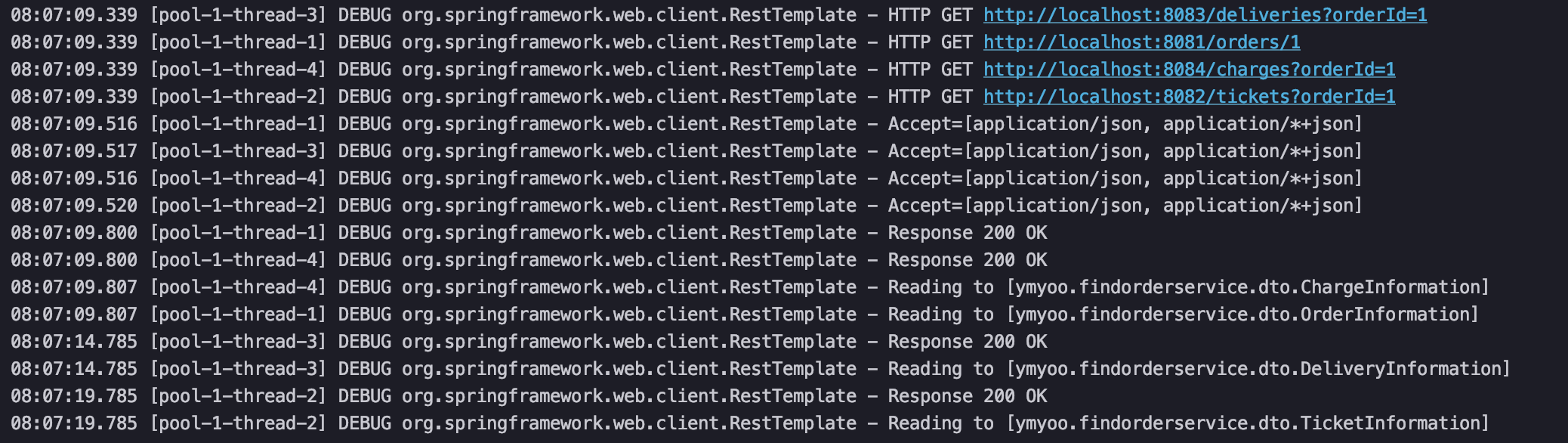
위의 로그를 보면 4개의 Thread에 API 호출 작업이 할당되어 동시에 실행한 것을 확인할 수 있다.
ExecutorService는 Concurrency API의 일부로서 Thread를 관리한다. 따라서 직접 Thread를 생성할 필요가 없으며 submit 메소드로 작업을 전달하면 ExecutorService는 Thread에 작업을 할당한다.
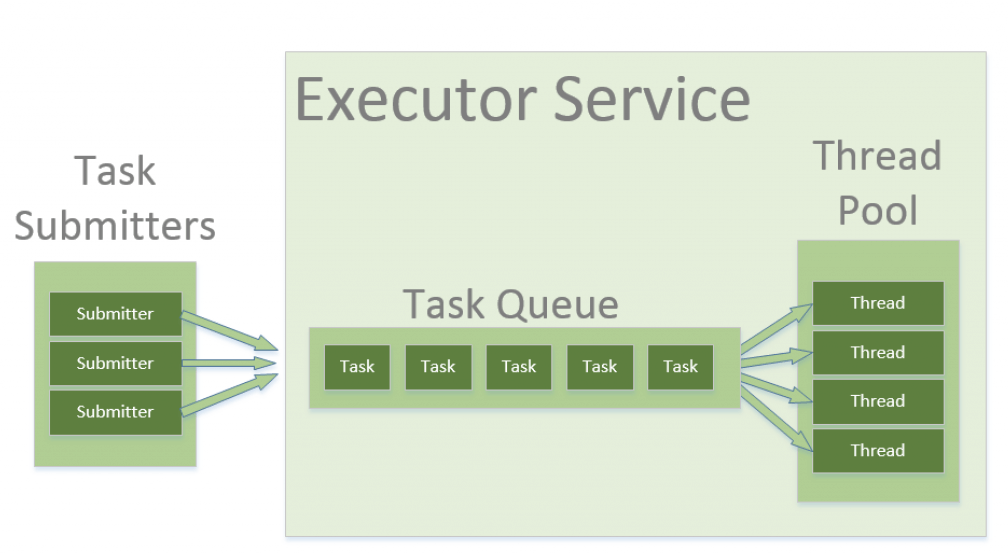
submit 메소드는 여러 개가 존재하는데 필자의 경우 작업(API 호출) 실행 결과를 반환받아야 하기 때문에 Callable를 매개변수로 하고 Future를 반환하는 sumit 메소드를 사용하였다.
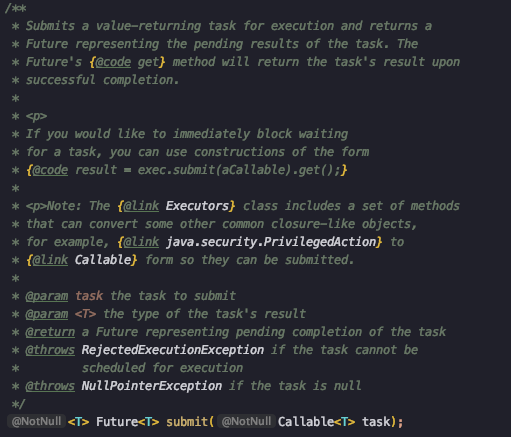
Callable 역시 Concurrency API 일부로 작업 실행 결과 값을 받고 싶을 때 사용한다.
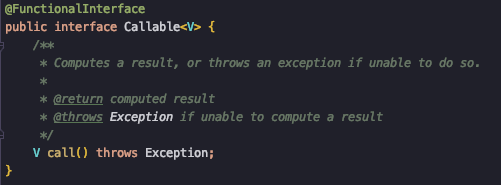
Functional 인터페이스이므로 아래와 같이 람다 표현식으로 사용할 수 있다.
Callable<OrderInformation> task1 = () -> {
  OrderInformation orderInformation =
      restTemplate.getForObject(String.format("http://localhost:8081/orders/%s", orderId), OrderInformation.class);
  return orderInformation;
};Future는 현재 작업의 상태 그리고 작업이 완료되는 것을 기다리거나 작업의 결과를 조회하는 기능을 제공하는데 그중에서 get 메소드는 작업이 끝나기를 기다리고 실행 결과를 가져온다.
Future<OrderInformation> orderFuture = executor.submit(task1);
OrderInformation orderInformation = orderFuture.get();
Future의 한계
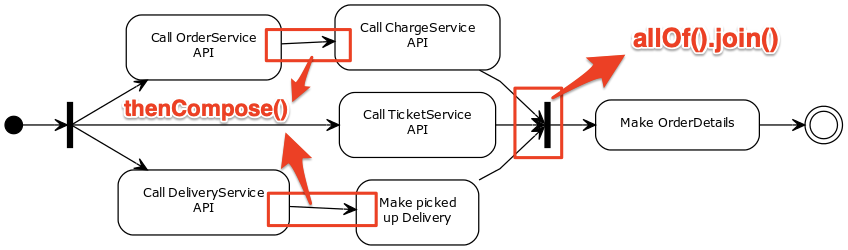
단순하게 여러 API를 동시에 호출하여 결과를 조립하는 경우도 있지만 그렇지 않은 경우도 있다. 예를 들면 아래와 같이 처음에는 동시에 호출로 시작하고 특정 작업이 끝나면 후속 작업을 수행하고 기다렸다가 결과를 조립한다.
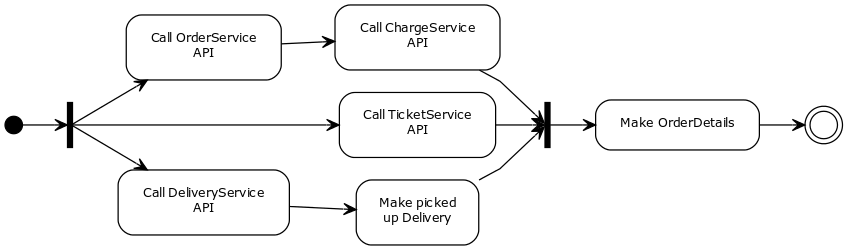
위와 같이 처리하기 위해서는 비동기 작업들을 함께 묶어서 다루어야 하는데 Future는 지원하지 않는다.
CompletableFuture
Java 8에서 Concurrency API 향상으로 도입된 것이 CompletableFuture이다. CompletableFuture는 비동기 작업들을 함께 묶을 수 있으며 더 나아가 단계로 구성할 수 있다.
앞서 언급한 주문 상세(OrderDetails) 조립 활동도는 CompletableFuture로 아래와 같이 구현할 수 있다.
// Call OrderService API
CompletableFuture<PurchaseOrderInformation> purchaseOrderInfoCF = CompletableFuture.supplyAsync(() -> {
  OrderInformation orderInformation =
      restTemplate.getForObject(String.format("http://localhost:8081/orders/%s", orderId), OrderInformation.class);
  return orderInformation;
}).thenCompose(orderInformation -> CompletableFuture.supplyAsync(() -> {
  // Call ChargeService API
  ChargeInformation chargeInformation =
      restTemplate.getForObject(String.format("http://localhost:8084/charges/%s", orderInformation.getChargeId()), ChargeInformation.class);
  return new PurchaseOrderInformation(orderInformation, chargeInformation);
}));

// Call TicketService API
CompletableFuture<TicketInformation> ticketInfoCF = CompletableFuture.supplyAsync(() -> {
  TicketInformation ticketInformation =
      restTemplate.getForObject(String.format("http://localhost:8082/tickets?orderId=%s", orderId), TicketInformation.class);
  return ticketInformation;
});

// Call DeliveryService API
CompletableFuture<PickedUpDeliveryInformation> pickedUpDeliveryInfoCF = CompletableFuture.supplyAsync(() -> {
  DeliveryInformation deliveryInformation =
      restTemplate.getForObject(String.format("http://localhost:8083/deliveries?orderId=%s", orderId), DeliveryInformation.class);
  return deliveryInformation;
}).thenCompose(deliveryInformation -> CompletableFuture.supplyAsync(() -> {
  // Make PickedUpDelivery
  // ...
  return new PickedUpDeliveryInformation();
}));

// 모든 작업이 끝나기를 기다린다.
CompletableFuture.allOf(purchaseOrderInfoCF, ticketInfoCF, pickedUpDeliveryInfoCF).join();

// 실행 결과 조회
PurchaseOrderInformation purchaseOrderInformation = purchaseOrderInfoCF.get();
TicketInformation ticketInformation = ticketInfoCF.get();
PickedUpDeliveryInformation pickedUpDeliveryInformation = pickedUpDeliveryInfoCF.get();
// Make OrderDetails
new OrderDetails(purchaseOrderInformation, ticketInformation, pickedUpDeliveryInformation);
supplyAsync()는 비동기적으로 실행하여 결과를 반환하며 thenCompose()는 두 개의 비동기 작업을 연결하고 첫 번째 작업의 실행 결과를 두 번째 작업으로 전달하는 역할을 한다.
allOf().join()은 열거된 CompletableFuture(purchaseOrderInfoCF, ticketInfoCF, pickedUpDeliveryInfoCF)가 모두 완료되는 것을 기다린다.
위의 코드에서는 Thread나 ExecutorService가 보이지 않는데 그 이유는 CompletableFuture가 내부적으로 ForkJoinPool을 사용하기 때문이다.
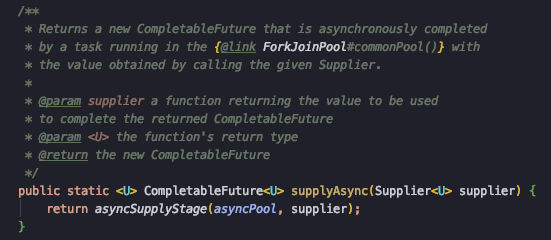
필요하다면 ExecutorService로 만든 Executor를 CompletableFuture에 전달하여 사용할 수도 있다.
예외 처리
CompletableFuture는 두 개의 메소드로 예외를 다룰 수 있다.
- exceptionally()
- handle()
아래는 두 개의 작업 실행 중간에 예외가 발생하면 exceptionally()로 처리하는 코드 예시이다.
CompletableFuture<PurchaseOrderInformation> purchaseOrderInfoCompletableFuture = CompletableFuture.supplyAsync(() -> {
    // ...
}).thenCompose(orderInformation -> CompletableFuture.supplyAsync(() -> {
    // ...
})).exceptionally(exception -> {
    System.out.println("예외 발생...");
    // ...
    return new PurchaseOrderInformation();
});
같은 예외 처리를 handle()로도 처리가 가능하다.
CompletableFuture<PurchaseOrderInformation> purchaseOrderInfoCompletableFuture = CompletableFuture.supplyAsync(() -> {
    // ...
}).thenCompose(orderInformation -> CompletableFuture.supplyAsync(() -> {
    // ...
})).handle((purchaseOrderInformation, throwable) -> {
    if(throwable != null) {
        System.out.println("예외 발생...");
        throwable.printStackTrace();
        return new PurchaseOrderInformation();
    } else {
        return purchaseOrderInformation;
    }
});
exceptionally()와 handle()의 차이점은 exceptionally는 예외가 발생하는 경우에만 handle은 예외 발생 여부와 상관없이 실행된다.
Timeout
어떤 API는 중요한 정보가 아니라서 정해진 시간 이내에 응답이 오지 않으면 무시하고 결과를 전달할 필요가 있다.
Java 8의 CompletableFuture는 명시적으로 timeout을 지원하지 않는다. 다행히도 Java 9부터 CompletableFuture는 orTimeout 메소드를 지원한다.
아래 코드는 5초를 기다렸다가 응답이 없으면 TimeoutException이 발생하여 handle()을 통해 빈 객체를 반환한다.
CompletableFuture<TicketInformation> ticketInfoCF = CompletableFuture.supplyAsync(() -> {
    // ...
}).orTimeout(5, TimeUnit.SECONDS).handle((ticketInformation, throwable) -> {
    if(throwable != null) {
        System.out.println("예외 발생...");
        throwable.printStackTrace();
        return new TicketInformation()
    } else {
        return ticketInformation;
    }
});