> ## Content Index
> Fetch the complete content index at: https://www.popit.kr/llms.txt
> Use this file to discover other available public pages before exploring further.
# 스프링 부트 Auto-configuration과 JPA(하이버네이트) SQL문 로깅
- URL: https://www.popit.kr/spring-boot-autoconfiguration-hibernate-sql-logging/
- Published: 2018-08-22T01:49:41.000Z
- Updated: 2018-08-22T01:49:41.000Z
- Author: 유 영모
- Tags: #소프트웨어, Java, JPA, Hibernate, Spring, Spring Boot
JPA(하이버네이트)로 개발하다 보면 JPA가 자동으로 만들어 실행하는 SQL문을 확인하고 싶을 때가 있다. 이 글은 스프링 부트와 JPA를 함께 사용하는 환경에서 SQL문을 로깅Logging하는 방법을 소개한다.
# 예제 프로젝트
이해를 돕기 위해 간단한 스프링 부트 + JPA 예제 프로젝트를 만들고 SQL문 로깅을 추가해 보자.
예제 프로젝트는 스프링 부트에서 제공하는 부트스트랩Bootstrap 도구인 [SPRING INITIALIZR](https://start.spring.io/?ref=popit.kr)로 프로젝트를 만든다. 의존성으로 JPA와 별도로 데이터베이스 설치하지 않고 사용할 수 있는 [H2](http://www.h2database.com/html/main.html?ref=popit.kr)를 추가하여 프로젝트를 생성한다.\[1\]
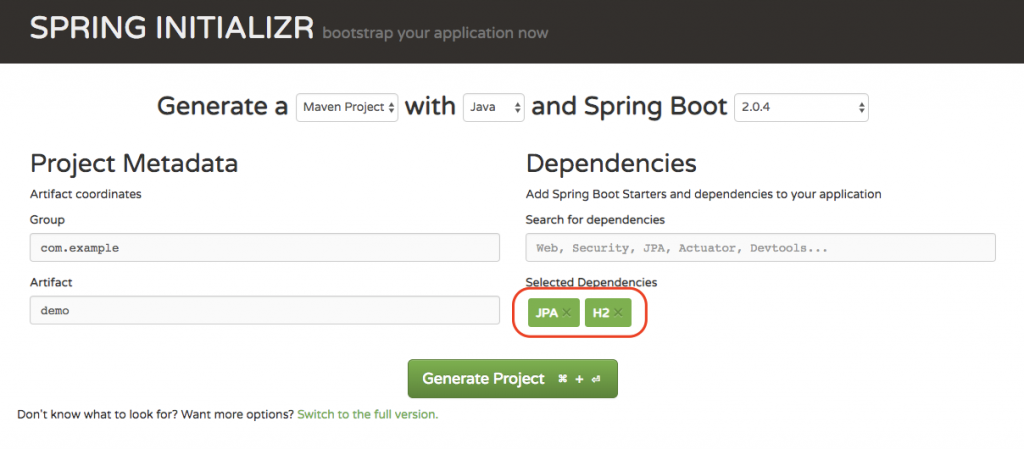
그림. https://start.spring.io/
생성된 예제 프로젝트의 [Maven POMProjectObjectModel](https://maven.apache.org/pom.html?ref=popit.kr#What%5Fis%5Fthe%5FPOM) 파일은 아래와 같다.
```xhtml
//...
org.springframework.boot
spring-boot-starter-parent
2.0.4.RELEASE
org.springframework.boot
spring-boot-starter-data-jpa
com.h2database
h2
runtime
org.springframework.boot
spring-boot-starter-test
test
//...
```
데이터베이스에 저장될 Member 엔티티Entitiy와 이를 수행할 MemberRepository를 아래와 같이 작성한다.
```java
@Entity
public class Member {
@Id
@GeneratedValue(strategy = GenerationType.AUTO)
private Long id;
private String name;
private String addr;
public Member() {
}
public Member(String name, String addr) {
this.name = name;
this.addr = addr;
}
//...
}
public interface MemberRepository extends JpaRepository {
}
```
마지막으로 Member 엔티티 생성하고 데이터베이스에 저장하는 코드를 스프링 부트 구동 시점에 실행 되도록 [CommandLineRunner](https://docs.spring.io/spring-boot/docs/current/api/org/springframework/boot/CommandLineRunner.html?ref=popit.kr)에 작성한다.
```java
@SpringBootApplication
public class HibernateSqlLoggingApplication {
// ...
@Bean
public CommandLineRunner initData(MemberRepository repository) {
return (args) -> {
repository.save(new Member("ymyoo", "Seoul"));
};
}
}
```
작성이 완료되면 프로젝트 구조는 아래와 같이 된다.
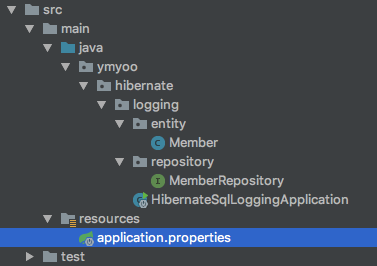
그림. 예제 프로젝트 구조
이제 애플리케이션을 실행해 보자.
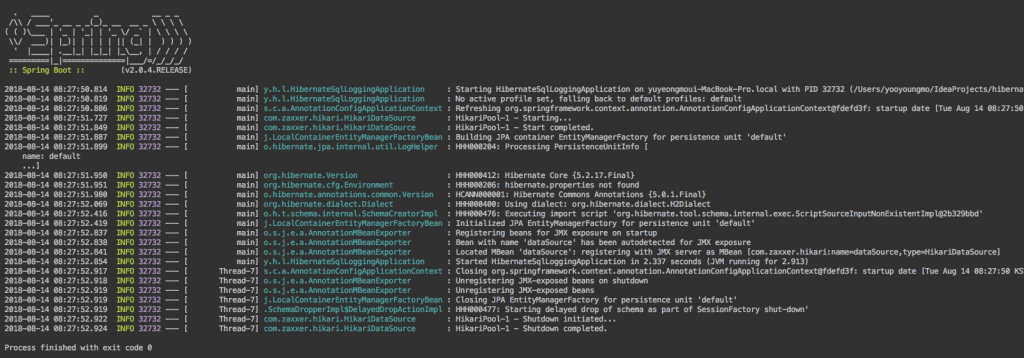
스프링 애플리케이션이 시작되고 곧바로 종료되었다. 무슨 일이 있었을까? Member 엔티티는 데이터베이스에 저장되긴 했을까?
SQL문 로깅으로 확인해 보자.
# spring.jpa.properties.hibernate.show\_sql
application.properties 파일에 아래와 같이 추가하고 애플리케이션을 다시 실행해 보자.
```
spring.jpa.properties.hibernate.show_sql=true
```
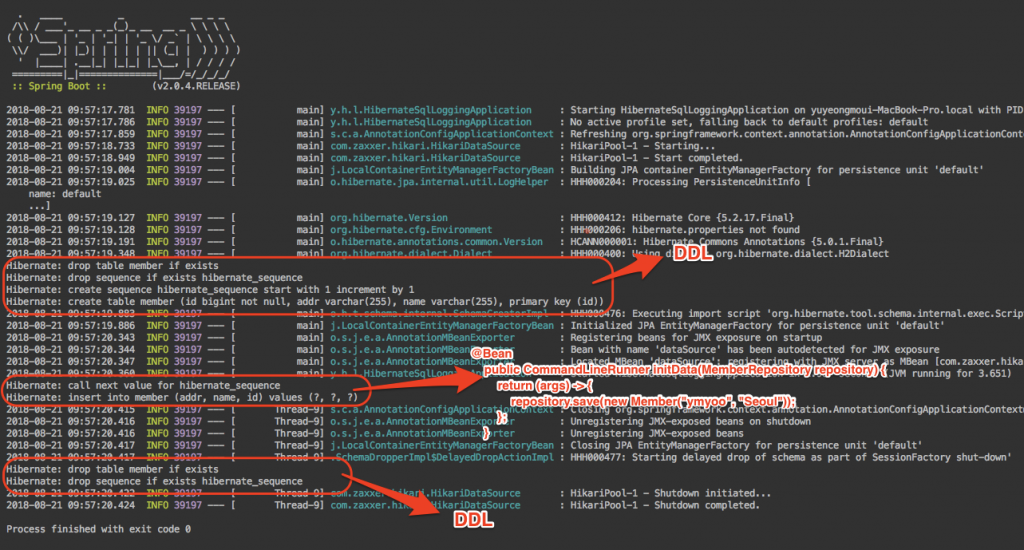
그림. spring.jpa.properties.hibernate.show\_sql=true 설정 후 애플리케이션 로그
# 스프링 부트 [Auto-configuration](https://docs.spring.io/spring-boot/docs/current/reference/html/using-boot-auto-configuration.html?ref=popit.kr)과 하이버네이트
application.properties 파일에 spring.jpa.properties.hibernate.show\_sql=true 한 줄을 추가했을 뿐인데 SQL문이 콘솔에 출력되었다. 어떻게 된 일인지 좀 더 상세히 알아보자.
스프링 부트가 나오기 이전에는 스프링을 사용하기 위해서 많은 설정이 필요했다. 스프링 부트는 기존 스프링 설정을 보다 적게 할 수 있도록 Auto-configuration을 도입하였다. 예제 프로젝트에서는 Maven 의존성 라이브러리로 spring-boot-starter-data-jpa와 h2 데이터베이스가 추가되어있다. 스프링 부트 AutoConfiguration은 스프링 애플리케이션을 실행하면서 추가된 라이브러리([JAR](https://en.wikipedia.org/wiki/JAR%5F%28file%5Fformat%29?ref=popit.kr))를 인식하여 JPA(하이버네이트)와 H2 데이터베이스 설정을 **스프링 부트 기본 설정값으로 자동 설정**해 준다. 그래서 예제 프로젝트에는 하이버네이트와 H2 데이터베이스 관련 설정을 찾아볼 수 없다.
위에서 콘솔에 출력된 SQL문은 하이버네이트에 의해 출력된 것이다. 하이버네이트 문서에 따르면 하이버네이트 'hiberante.show\_sql'을 'true'로 설정하면 하이버네이트가 실행하는 모든 SQL문을 콘솔로 출력해 준다.
> **hibernate.show\_sql (e.g. true or false (default value))** Write all SQL statements to the console. This is an alternative to setting the log category org.hibernate.SQL to debug.
>
>
>
> [https://docs.jboss.org/hibernate/orm/5.2/userguide/html\_single/Hibernate\_User\_Guide.html#\_sql\_statement\_logging](https://docs.jboss.org/hibernate/orm/5.2/userguide/html%5Fsingle/Hibernate%5FUser%5FGuide.html?ref=popit.kr#%5Fsql%5Fstatement%5Flogging)
**결국 스프링 부트 설정 파일인 application.properties에 spring.jpa.properties.hibernate.show\_sql=true 추가한다는 것은 스프링 부트가 하이버네이트 자동 설정 시 하이버네이트 'hiberante.show\_sql'을 'true'로 설정해 달라는 의미이다.**
그렇다면 출력된 [DDLData Definition Language](https://en.wikipedia.org/wiki/Data%5Fdefinition%5Flanguage?ref=popit.kr)은 무엇일까? 여기에도 역시 스프링 부트 Auto-configuration이 있다.
하이버네이트에는 작성된 엔티티를 기준으로 데이터베이스 스키마를 자동으로 생성해 주는 기능이 있다.
> **hibernate.hbm2ddl.auto (e.g. none (default value), create-only, drop, create, create-drop, validate, and update)** Setting to perform SchemaManagementTool actions automatically as part of the SessionFactory lifecycle. Valid options are defined by the externalHbm2ddlName value of the Action enum:
>
> none
> No action will be performed.create-only
> Database creation will be generated.drop
> Database dropping will be generated.create
> Database dropping will be generated followed by database creation.create-drop
> Drop the schema and recreate it on SessionFactory startup. Additionally, drop the schema on SessionFactory shutdown.validate
> Validate the database schemaupdate
> Update the database schema
>
> [https://docs.jboss.org/hibernate/orm/5.2/userguide/html\_single/Hibernate\_User\_Guide.html#configurations-hbmddl](https://docs.jboss.org/hibernate/orm/5.2/userguide/html%5Fsingle/Hibernate%5FUser%5FGuide.html?ref=popit.kr#configurations-hbmddl)
예제 프로젝트에서는 별도의 데이터베이스 설치하지 않고 사용하기 위해서 H2 데이터베이스를 [In-Memory](http://www.h2database.com/html/features.html?ref=popit.kr#in%5Fmemory%5Fdatabases) 모드로 사용하고 있다. **스프링 부트 Auto-configuration은 H2 데이터베이스** [**In-Memory**](http://www.h2database.com/html/features.html?ref=popit.kr#in%5Fmemory%5Fdatabases) **모드와 같이 데이터베이스를 애플리케이션에 내장Embedded 되어 사용하는 경우 하이버네이트 'hibernate.hbm2ddl.auto'을 'create-drop'으로 설정한다**. 'create-drop'으로 설정하면 애플리케이션 시작 시 하이버네이트가 스키마를 자동 생성하고 종료 시 삭제한다.
위에서 spring.jpa.properties.hibernate.show\_sql=true로 설정했기 때문에 하이버네이트 스키마 자동 생성/삭제 DDL이 함께 출력된 것이다.
# spring.jpa.properties.hibernate.format\_sql
하이버네이트 'hibernate.format\_sql'을 'true'로 설정하면 SQL문을 보기 좋게 출력해 준다.
> **hibernate.format\_sql (e.g. true or false (default value))** Pretty-print the SQL in the log and console.
>
>
>
> [https://docs.jboss.org/hibernate/orm/5.2/userguide/html\_single/Hibernate\_User\_Guide.html#\_sql\_statement\_logging](https://docs.jboss.org/hibernate/orm/5.2/userguide/html%5Fsingle/Hibernate%5FUser%5FGuide.html?ref=popit.kr#%5Fsql%5Fstatement%5Flogging)
스프링 부트 application.properties에는 아래와 같이 설정해 주면 된다.
```
spring.jpa.properties.hibernate.show_sql=true
spring.jpa.properties.hibernate.format_sql=true
```
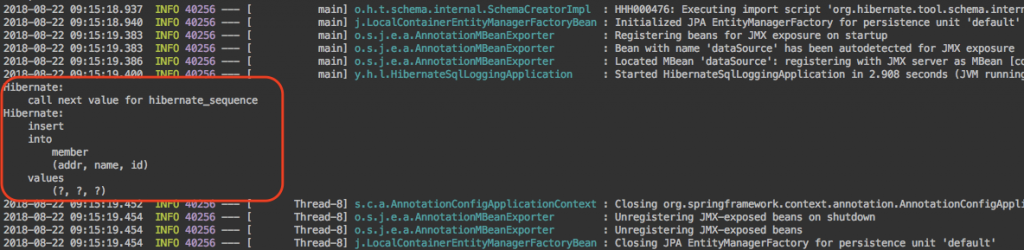
그림. spring.jpa.properties.hibernate.format\_sql=true 설정 후 애플리케이션 로그
이전에는 한 줄로 출력 되었던 INSERT문이 읽기 좋게 출력된 것을 확인할 수 있다.
# spring.jpa.properties.hibernate.use\_sql\_comments
하이버네이트 'hibernate.use\_sql\_comments'을 'true'로 설정하면 디버깅이 용이하도록 SQL문 이외에 추가적인 정보를 출력해 준다.
> **hibernate.use\_sql\_comments (e.g. true or false (default value))** If true, Hibernate generates comments inside the SQL, for easier debugging.
>
>
>
> [https://docs.jboss.org/hibernate/orm/5.2/userguide/html\_single/Hibernate\_User\_Guide.html#\_sql\_statement\_logging](https://docs.jboss.org/hibernate/orm/5.2/userguide/html%5Fsingle/Hibernate%5FUser%5FGuide.html?ref=popit.kr#%5Fsql%5Fstatement%5Flogging)
스프링 부트 application.properties에는 아래와 같이 설정해 주면 된다.
```
spring.jpa.properties.hibernate.show_sql=true
spring.jpa.properties.hibernate.format_sql=true
spring.jpa.properties.hibernate.use_sql_comments=true
```
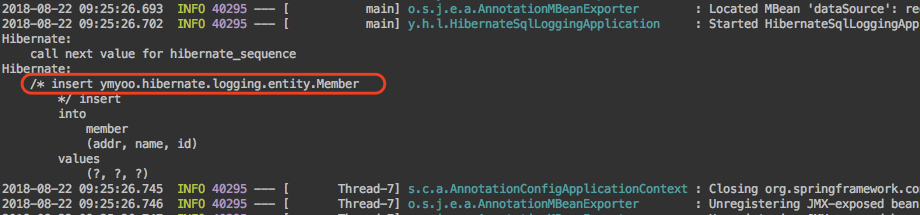
그림. spring.jpa.properties.hibernate.use\_sql\_comments=true 설정 후 애플리케이션 로그
SQL문 이외에 엔티티 정보를 함께 출력된 것을 확인할 수 있다.
# logging.level.org.hibernate.type.descriptor.sql
위의 출력된 SQL문 중 물음표로 표기된 부분을 하이버네이트에서는 바인드 파라미터Bind Parameter라고 한다.
스프링 부트 application.properties에는 아래와 같이 설정해 주면 바인드 파라미터를 출력해 준다.
```
spring.jpa.properties.hibernate.show_sql=true
spring.jpa.properties.hibernate.format_sql=true
spring.jpa.properties.hibernate.use_sql_comments=true
logging.level.org.hibernate.type.descriptor.sql=trace
```
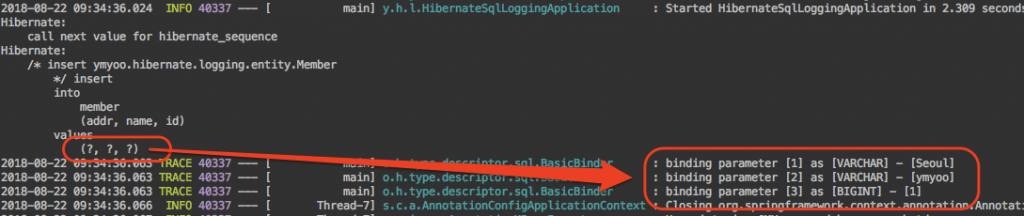
그림. logging.level.org.hibernate.type.descriptor.sql=trace 설정 후 애플리케이션 로그
# GitHub
전체 코드는 필자의 [GitHub 저장소](https://github.com/YooYoungmo/article-spring-boot-hibernate-sql-logging?ref=popit.kr)에서 확인할 수 있다.
# 주석
\[1\] 예제를 단순화하기 위해 웹 관련 의존성은 제외하였다.
# 참고 자료
- [https://docs.jboss.org/hibernate/orm/5.2/userguide/html\_single/Hibernate\_User\_Guide.html](https://docs.jboss.org/hibernate/orm/5.2/userguide/html%5Fsingle/Hibernate%5FUser%5FGuide.html?ref=popit.kr)