> ## Content Index
> Fetch the complete content index at: https://www.popit.kr/llms.txt
> Use this file to discover other available public pages before exploring further.
# Spring Security OAuth2 소셜 인증
- URL: https://www.popit.kr/spring-security-oauth2-social-auth/
- Published: 2018-10-06T16:59:31.000Z
- Updated: 2018-10-06T16:59:31.000Z
- Author: Yun
- Tags: #소프트웨어, Spring, OAuth2, Social
Spring Scurity OAuth2를 활용해서 Facebook, Google 계정 기반으로 정말 간단하게 인증 처리를 할 수 있습니다. 들어가기에 앞서 [OAuth 2인증 방식 : Authorization Code Grant](https://github.com/minwan1/spring-security-oauth2-example/blob/master/docs/step-1%3Aoauth1%2Coauth2%EB%9E%80.md?ref=popit.kr#%EC%9D%B8%EC%A6%9D-%EC%A2%85%EB%A5%98) **반드시 기본적인 이해를 하시는것을 권장드립니다.** [생활코딩](https://www.youtube.com/watch?v=hm2r6LtUbk8&index=1&list=PLuHgQVnccGMA4guyznDlykFJh28%5FR08Q-&ref=popit.kr)에도 잘 정의되어있습니다.
Google, Facebook App 생성 및 Https 설정을 하지 않았다면 [step-00: gogole, facebook, https 설정](https://github.com/cheese10yun/spring-security-oauth2-social/blob/master/doc/step-00.md?ref=popit.kr)을 참고하여 작업을 완료해주세요. **전체코드는** [**Github**](https://github.com/cheese10yun/spring-security-oauth2-social?ref=popit.kr)**에 공게되어 있습니다**.
## 프로젝트 기본 설정
### maven
```
org.springframework.security.oauth
spring-security-oauth2
2.3.3.RELEASE
org.springframework.security.oauth.boot
spring-security-oauth2-autoconfigure
2.0.0.RELEASE
```
### application.yml
```
facebook:
client:
clientId:
clientSecret:
accessTokenUri: https://graph.facebook.com/oauth/access_token
userAuthorizationUri: https://www.facebook.com/dialog/oauth
tokenName: oauth_token
authenticationScheme: query
clientAuthenticationScheme: form
resource:
userInfoUri: https://graph.facebook.com/me
google :
client :
clientId :
clientSecret:
accessTokenUri: https://www.googleapis.com/oauth2/v4/token
userAuthorizationUri: https://accounts.google.com/o/oauth2/v2/auth
clientAuthenticationScheme: form
scope:
- email
- profile
resource:
userInfoUri: https://www.googleapis.com/oauth2/v3/userinfo
```
## 소셜 인증 구현
```
class ClientResources {
@NestedConfigurationProperty
private AuthorizationCodeResourceDetails client = new AuthorizationCodeResourceDetails();
@NestedConfigurationProperty
private ResourceServerProperties resource = new ResourceServerProperties();
public AuthorizationCodeResourceDetails getClient() {
return client;
}
public ResourceServerProperties getResource() {
return resource;
}
}
```
ClientResources 클래스를 생성합니다. 해당 클래스는 위에서 설정한 property 설정을 편리하게 사용할 수 있습니다.
```
EnableWebSecurity
@EnableOAuth2Client
public class SecurityConfig extends WebSecurityConfigurerAdapter {
....
@Bean
@ConfigurationProperties("facebook")
public ClientResources facebook() {
return new ClientResources();
}
@Bean
@ConfigurationProperties("google")
public ClientResources google() {
return new ClientResources();
}
}
```
EnableWebSecurity, EnableOAuth2Client 어노테이션을 추가합니다.
위에서 작성한 properties 들을 빈으로 등록해줍니다. ClientResources 클래스 덕분에 저렇게 쉽게 property 설정을 쉽게 설정할 수 있습니다.
```
public class SecurityConfig extends WebSecurityConfigurerAdapter {
...
@Override
protected void configure(HttpSecurity http) throws Exception {
// @formatter:off
http.antMatcher("/**").authorizeRequests().antMatchers("/", "/login**").permitAll().anyRequest()
.authenticated().and().exceptionHandling()
.authenticationEntryPoint(new LoginUrlAuthenticationEntryPoint("/")).and()
.addFilterBefore(ssoFilter(), BasicAuthenticationFilter.class);
// logout
http.logout()
.invalidateHttpSession(true)
.clearAuthentication(true)
.logoutRequestMatcher(new AntPathRequestMatcher("/logout"))
.logoutSuccessUrl("/")
.permitAll();
// @formatter:on
}
}
```
스프링 시큐리티 코드입니다. 해당 설정은 어렵지 않으니 자세한 설명은 생략하겠습니다. 중요한 포인트는 addFilterBefore메서드로 ssoFilter 필터를 등록했습니다. 해당 필터는 아래에서 다루겠습니다.
```
public class SecurityConfig extends WebSecurityConfigurerAdapter {
...
@Bean
public FilterRegistrationBean oauth2ClientFilterRegistration(OAuth2ClientContextFilter filter) {
FilterRegistrationBean registration = new FilterRegistrationBean();
registration.setFilter(filter);
registration.setOrder(-100);
return registration;
}
}
```
인증 요청에 따른 리다이렉션을 위한 빈을 등록합니다. 이때 setOrder 메서드로 Spring Security 필터 보다 우선순위를 낮게 설정합니다.
```
public class SecurityConfig extends WebSecurityConfigurerAdapter {
...
private Filter ssoFilter() {
CompositeFilter filter = new CompositeFilter();
List filters = new ArrayList<>();
filters.add(ssoFilter(google(), "/login/google")); // 이전에 등록했던 OAuth 리다이렉트 URL
filters.add(ssoFilter(facebook(), "/login/facebook"));
filter.setFilters(filters);
return filter;
}
private Filter ssoFilter(ClientResources client, String path) {
OAuth2ClientAuthenticationProcessingFilter filter = new OAuth2ClientAuthenticationProcessingFilter(path);
OAuth2RestTemplate restTemplate = new OAuth2RestTemplate(client.getClient(), oauth2ClientContext);
filter.setRestTemplate(restTemplate);
UserInfoTokenServices tokenServices = new UserInfoTokenServices(client.getResource().getUserInfoUri(), client.getClient().getClientId());
tokenServices.setRestTemplate(restTemplate);
filter.setTokenServices(tokenServices);
return filter;
}
}
```
위에서 configure 등록했던 ssoFilter 설정 입니다. 위에서 등록했던 빈 google(), 이전에 등록했던 OAuth 리다이렉트 URL `/login/google 기반으로 Filter를 생성합니다.`
**OAuth2ClientAuthenticationProcessingFilter 필터는 인증 서버에서 OAuth2 액세스 토큰을 획득하고 인증 객체를 SecurityContext에로드하는 데 사용할 수 있는 OAuth2 클라이언트 필터입니다.**
setRestTemplate 메스들을 통해서 OAuth2 인증 REST 요청을 만들 수 있는 RestTemplate 객체를 지정합니다.
```
RestController
public class Controller {
@RequestMapping(value = "/", method = RequestMethod.GET)
public Principal home(Principal principal) {
return principal;
}
}
```
소셜 인증 이후 해당 컨트롤러로 이동하면 OAuth2ClientAuthenticationProcessingFilter 필터가 등록한 SecurityContextHolder 정보를 확인할 수 있습니다.
## 소셜 인증
### Facebook

[https://localhost:8080/login/facebook](https://localhost:8080/login/facebook?ref=popit.kr) 페이스북 로그인
### Google

[https://localhost:8080/login/google](https://localhost:8080/login/google?ref=popit.kr) 구글 로그인
## 내부 코드
별다른 설정 없이 Spring Scurity OAuth2 활용하면 어렵지 않게 소셜 기반으로 인증 처리를 구현할 수 있습니다. 가장 핵심적인 클래스 OAuth2ClientAuthenticationProcessingFilter 클래스를 살펴보겠습니다.
### attemptAuthentication 메서드

소셜 인증을 시도하는 메서드로 위에서 등록했던 restTemplate 으로 Access Token 을 가져오고 해당 토큰 값으로 사용자 정보를 가져옵니다.
위 그림은 break point를 찍은 화면으로 acctessToken에는 accessToken, socpe, expriation 가 있고 userAuthenication에는 소셜에서 받아온 회원정보가 있습니다.
### successfulAuthentication 메서드

attemptAuthentication 에서 인증이 성공되었다면 이후에 successfulAuthentication 메서드를 호출하게 됩니다.
여기서 중요한 포인트는 authResut 값을 `super.successfulAuthentication(request, response, chain, authResult); 메서드를 통해서 SecurityContextHolder에 저장되게 됩니다. 즉 소셜에서 받아온 정보 기반으로 인증 처리를 합니다.`
### 인증 정보
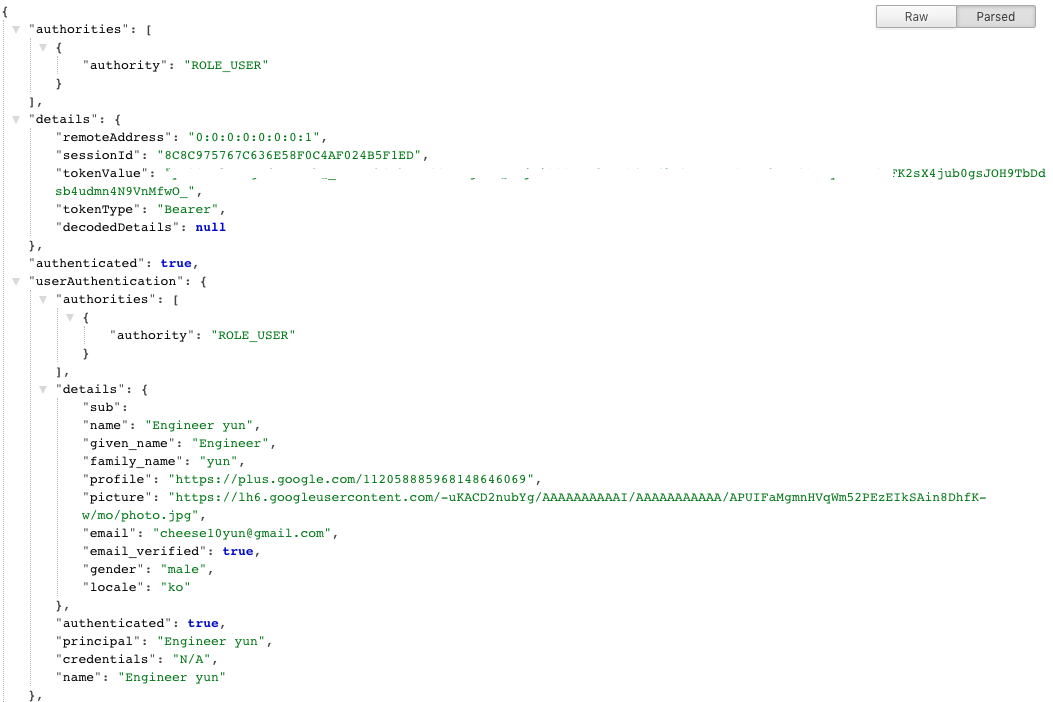
[https://localhost:8080/](https://localhost:8080/?ref=popit.kr) 에서 해당 유저의 세션 정보를 확인 할 수 있습니다.